
Cinebench R23 vs Cinebench 2024
Use Cinebench R23 for CPU-only testing with the largest score database for processor comparisons. Use Cinebench 2024 if you need GPU benchmarking through the Redshift engine alongside CPU scores. Scores between versions are not comparable.
What Separates R23 from Cinebench 2024
Cinebench R23 and Cinebench 2024 are both free benchmarking tools from Maxon. Both use Cinema 4D rendering technology. Both measure CPU performance through single-core and multi-core tests. The differences determine which version fits your specific testing goal.
Maxon released Cinebench R23 in June 2020. Cinebench 2024 arrived in September 2023. Each version uses a different rendering scene. This means scores from R23 and 2024 cannot be compared against each other directly.
Rendering Engine Differences
Cinebench R23 uses the Cinema 4D rendering engine for all CPU tests. It measures single-core responsiveness and multi-core throughput through a fixed 3D scene.
Cinebench 2024 upgrades the CPU test scene and adds the Redshift rendering engine for GPU benchmarking. Redshift is a production-grade GPU renderer used in professional 3D workflows. This addition makes Cinebench 2024 a dual-purpose benchmark covering both processor and graphics card performance.
| Feature | Cinebench R23 | Cinebench 2024 |
| Release Date | June 2020 | September 2023 |
| CPU Single-Core Test | Yes | Yes |
| CPU Multi-Core Test | Yes | Yes |
| GPU Benchmark | No | Yes, via Redshift |
| Minimum RAM | 4 GB | 16 GB |
| Minimum Runtime | 10 minutes | 10 minutes |
| Score Database Size | Very large | Growing |
| Windows Support | 7, 8, 10, 11 | 10, 11 only |
| macOS Support | 10.13.6 and newer | 11.7 and newer |
| ARM Support | Limited | Yes |
| Score Comparability | R23 only | 2024 only |
CPU Test: What Changed
Cinebench R23 renders a fixed scene using Cinema 4D’s core rendering pipeline. The 10-minute minimum test duration exposes thermal throttling and power limit issues that shorter benchmarks miss.
Cinebench 2024 renders a different, more complex scene. The updated scene reflects modern 3D production workloads more accurately than the R23 scene. Single-core scores in Cinebench 2024 typically range from 100 to 130 points for mainstream processors. Multi-core scores range from 800 to 2,000 points depending on core count and clock speed.
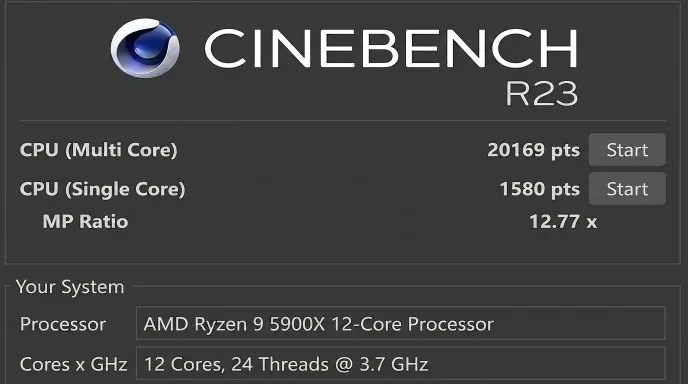
Cinebench R23 single-core scores range from 1,000 to 2,300 points. Multi-core scores range from 10,000 for budget 6-core chips to over 40,000 for high-end processors like the AMD Ryzen 9 9950X.
The scene change means a high R23 score does not predict a proportionally high 2024 score. Both versions must be treated as separate benchmarks.
GPU Test: Cinebench 2024 Only
Cinebench R23 has no GPU test. It measures CPU performance exclusively.
Cinebench 2024 introduces a Redshift-based GPU benchmark. The test renders a complex 3D scene using ray tracing and shading workloads that reflect actual content creation pipelines. This makes it relevant for 3D artists, video editors, and VFX professionals evaluating graphics card performance.
The GPU test requires a discrete graphics card with adequate VRAM. Integrated graphics cards do not produce valid results in the Cinebench 2024 GPU benchmark.
Score Database and Comparability
Cinebench R23 has the largest score database of any Cinebench version. Thousands of processors have published R23 results across hardware review sites, including AnandTech, Tom’s Hardware, and Notebookcheck. This makes R23 the most useful version for comparing your processor against published benchmarks.
Cinebench 2024 has a smaller but growing database. Major review publications now include 2024 scores alongside R23 results for new processor launches. For processors released after 2023, Cinebench 2024 scores are increasingly available for comparison.
R23 remains the better choice for cross-referencing against existing published data.
System Requirements Comparison
Cinebench R23 runs on Windows 7 through Windows 11 and macOS 10.13.6 or newer. It requires 4 GB RAM. The installer is 235 MB. This makes R23 accessible on older hardware and legacy systems.
Cinebench 2024 requires Windows 10 or Windows 11 in 64-bit. macOS 11.7 or newer is required. The minimum recommended RAM is 16 GB. The installer reaches 1.3 GB. Systems with 8 GB RAM may fail to complete the Cinebench 2024 CPU test on Windows due to memory allocation requirements.
Older systems, budget laptops, and machines running Windows 7 or 8 cannot run Cinebench 2024. Cinebench R23 remains the only option for these configurations.
Thermal and Stability Testing
Both versions support stability testing through repeated benchmark loops. Running 3 to 5 consecutive loops reveals thermal saturation, clock speed drops, and cooling system limits.
In Cinebench R23, score consistency across loops indicates stable thermal management. A drop of more than 5% between loop 1 and loop 4 signals thermal throttling or power limit activation.
Cinebench 2024 applies the same principle. The more demanding rendering scene generates higher sustained CPU loads. This makes Cinebench 2024 slightly more aggressive as a thermal stress tool compared to R23.
Overclockers use both versions. R23 for comparing against published OC results. Cinebench 2024 for validating stability under heavier modern workloads.
Which Version Hardware Reviewers Use
Hardware reviewers at Tom’s Hardware, AnandTech, Notebookcheck, and GamersNexus use Cinebench R23 as the primary CPU benchmark. The large score database allows direct comparison across processor generations spanning 2013 to present.
Cinebench 2024 appears alongside R23 in most post-2023 processor reviews. Publications use both versions to show performance across old and new benchmark scenes. Neither version has fully replaced the other in professional hardware journalism.
OEM system builders including Dell, HP, and Lenovo validate workstation performance using Cinebench R23 scores as part of procurement and quality assurance processes.
Cinebench R23 vs 2024 for Laptops
Laptop processors throttle more aggressively than desktop chips. Thin chassis designs limit heat dissipation. Both versions expose this behavior through sustained load testing.
Cinebench R23 laptop scores run 25% to 40% lower than desktop processors with identical model numbers. A Ryzen 9 7945HX in a laptop scores approximately 24,000 to 28,000 in R23 multi-core. The desktop Ryzen 9 7950X scores above 38,000.
Cinebench 2024 shows similar throttling patterns on laptops. The higher RAM requirement of 16 GB excludes some budget laptops with 8 GB configurations from running the 2024 version.
For laptop testing, R23 provides broader compatibility. For modern laptops with 16 GB RAM, Cinebench 2024 delivers more relevant workload simulation.
Cinebench R23 vs 2024 Score Comparison Table
| Processor | R23 Multi | R23 Single | CB 2024 Multi | CB 2024 Single |
| AMD Ryzen 9 9950X | 41,000+ | 2,200+ | 1,400+ | 130+ |
| Intel Core i9-14900K | 38,000+ | 2,100+ | 1,300+ | 125+ |
| AMD Ryzen 7 9800X3D | 32,000+ | 2,050+ | 1,100+ | 120+ |
| AMD Ryzen 7 7700X | 21,000+ | 1,950+ | 950+ | 115+ |
| Apple M3 Pro | 15,000+ | 1,800+ | 750+ | 110+ |
| Intel Core i5-13600K | 24,000+ | 1,900+ | 1,000+ | 112+ |
Scores vary based on cooling solution, RAM speed, BIOS settings, and ambient temperature. Values above represent results under controlled desktop conditions with adequate cooling.
When to Use R23
Use Cinebench R23 when:
- Comparing your CPU against thousands of published processor benchmarks
- Testing systems with less than 16 GB RAM
- Running on Windows 7, 8, or older macOS versions
- Validating overclocking stability against community results
- Benchmarking older processors from 2013 to 2020
- Working in IT environments with legacy hardware fleets
When to Use Cinebench 2024
Use Cinebench 2024 when:
- Benchmarking GPU performance alongside CPU scores
- Testing modern processors released after September 2023
- Evaluating content creation workstations for 3D and video production
- Comparing results with post-2023 hardware reviews
- Running on systems with 16 GB RAM and Windows 10 or 11
- Assessing Redshift GPU rendering performance for Cinema 4D workflows
For CPU comparison against existing published data, use Cinebench R23.
For GPU benchmarking and modern workload simulation, use Cinebench 2024.
Running both versions takes under 15 minutes total. R23 gives you the largest comparison database. Cinebench 2024 gives you GPU scores and a more current rendering workload. Most hardware reviewers run both versions for complete processor evaluation.
Frequently Asked Questions
Can you compare Cinebench R23 and 2024 scores? No. R23 and Cinebench 2024 use different rendering scenes. A score from one version has no equivalent value in the other. Always compare scores within the same version.
Is Cinebench 2024 better than R23? Cinebench 2024 adds GPU benchmarking and a more current rendering scene. R23 has a larger score database. Neither version is universally better. Each serves a different testing purpose.
Does Cinebench 2024 replace R23? No. Cinebench 2024 did not replace R23. Maxon continues to distribute both versions. R23 remains the standard for CPU-only comparisons across the widest range of hardware.
What are the system requirements for Cinebench 2024? Cinebench 2024 requires Windows 10 or 11 (64-bit) or macOS 11.7 and newer. Minimum recommended RAM is 16 GB. The installer size is 1.3 GB.
Which Cinebench version do hardware reviewers use? Most hardware reviewers use Cinebench R23 as the primary CPU benchmark. Cinebench 2024 appears alongside R23 in reviews published after September 2023.
Conclusion
Cinebench R23 and Cinebench 2024 serve different purposes. R23 covers CPU testing with the deepest comparison database available. Cinebench 2024 adds Redshift GPU benchmarking and a more demanding rendering scene for modern hardware. Both versions are free, safe, and distributed directly by Maxon. Download R23 for CPU comparisons. Download Cinebench 2024 for combined CPU and GPU evaluation on systems meeting the 16 GB RAM requirement.